QuickSend
EasyParcel-logo-md
QuickSend
EasyParcel-logo-md

QuickSend Seamless Integration

Streamline your QuickSend store with EasyParcel. Enjoy automated shipping, delivery updates, and improved customer satisfaction.
Connect now and elevate your eCommerce business.

How EasyParcel Helps You?

Automate Data Entry​

Skip manual data entry. Customers fill, EasyParcel gets.

4 Easy Setup Steps

Easily integrate EasyParcel with QuickSend to simplify shipping processes.

Free Integration Demo

Get a free demo to understand the integration process and benefits.

Flexible Pickup & Drop-off

Choose preferred couriers for pickup or drop-off point, ensuring reliable shipping.

Cheapest Courier Options

Automatically find the cheapest couriers, reducing QuickSend shipping costs.

Zero Cost

Integrate EasyStore without setup fees, keeping your costs low.

Need Help? WhatsApp for Premium Support!

How To Integrate Quicksend in EasyParcel?

EasyParcel QuickSend Form Guide
Enlarged screenshot
100%
dynamic_feed

QuickSend

Create and share an order form in 4 steps.

  • login

    Login to EasyParcel

    Log in to your EasyParcel account to get started.

  • add_box

    Create Order Form

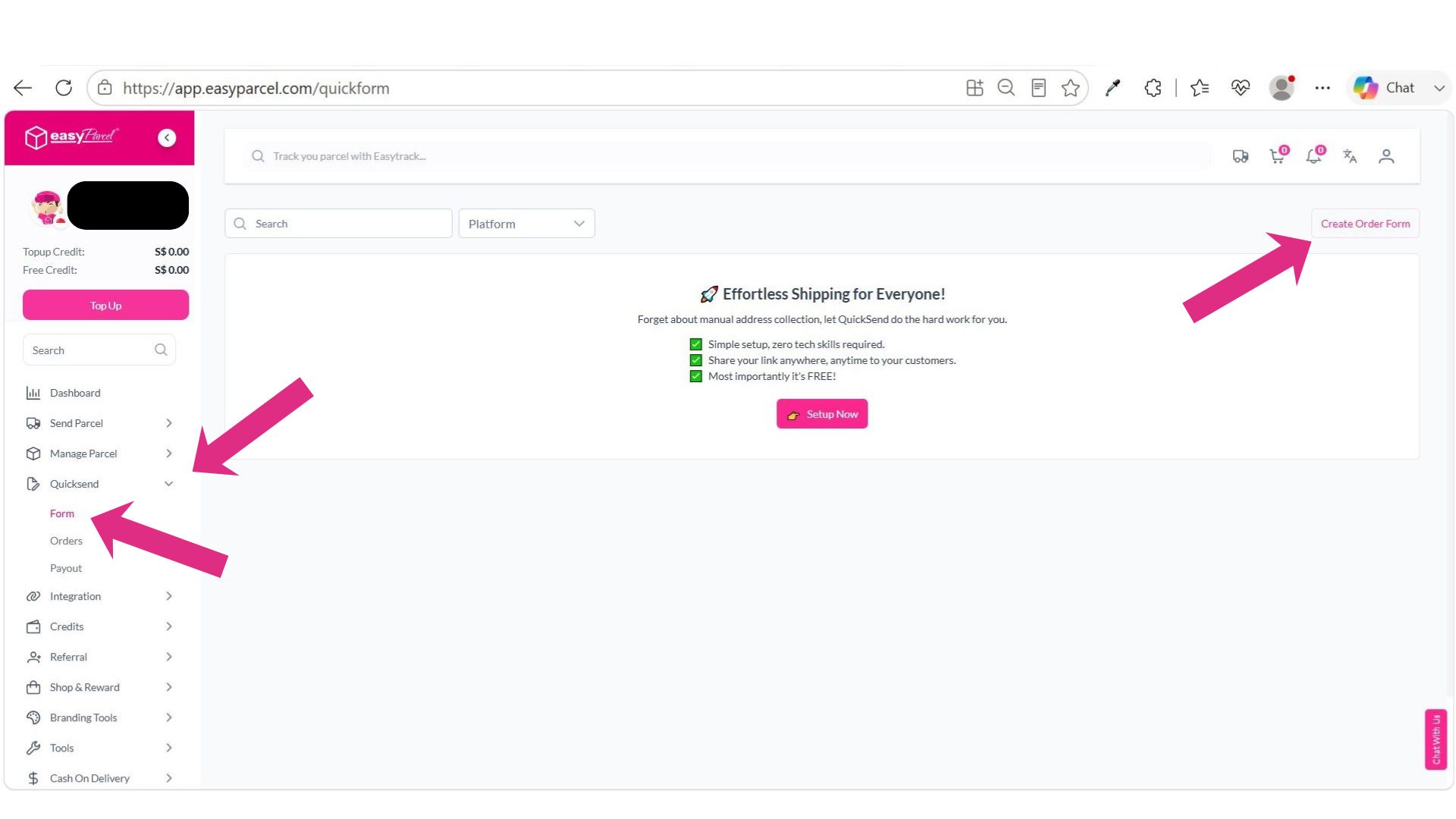
    Go to QuickSend > Form and click 'Create Order Form'.

  • edit_note

    Fill In Details & Publish

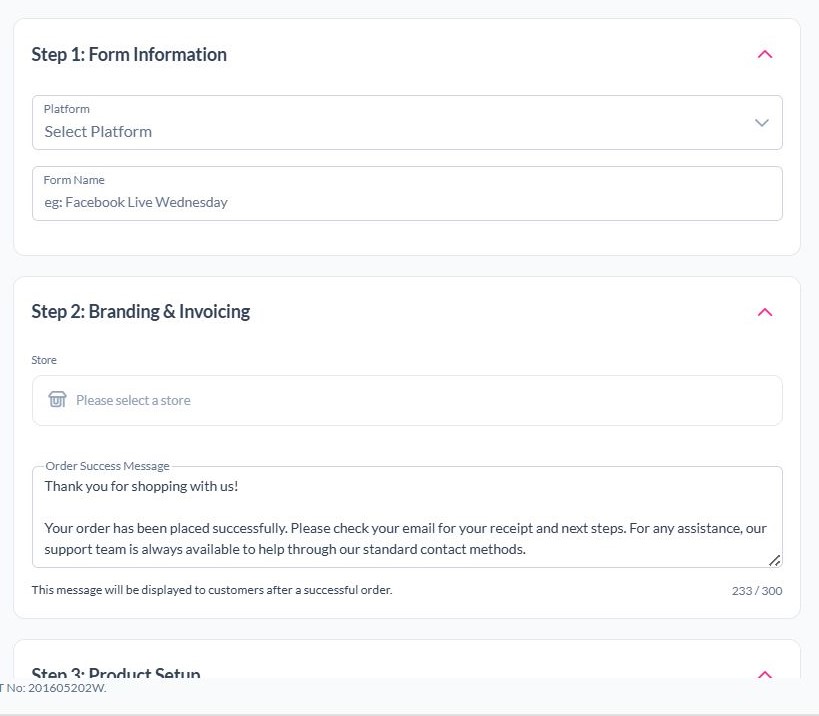
    Complete all required details, then click 'Publish & Preview'.

  • share

    Copy & Share Form Link

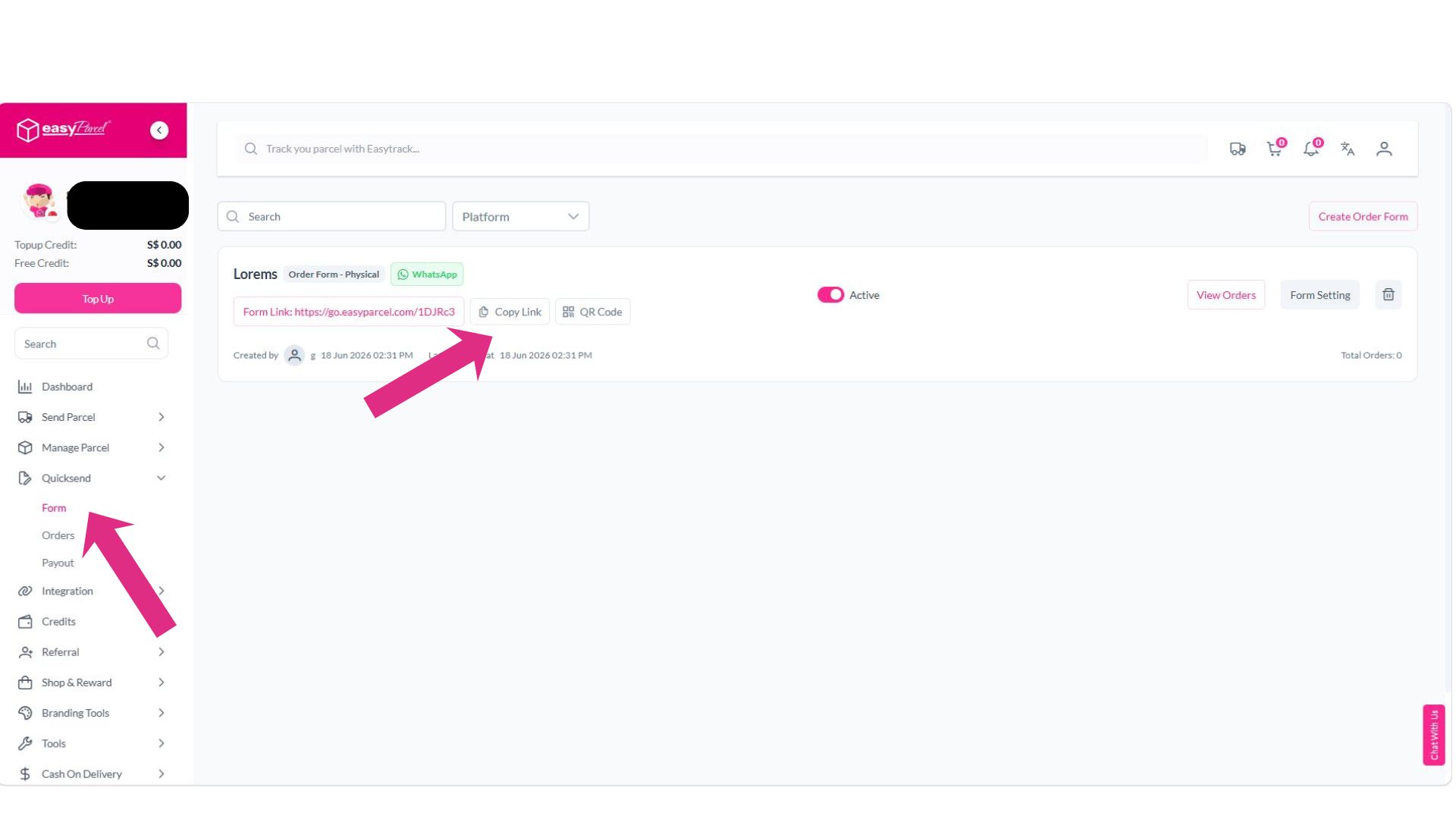
    Copy the generated form link and share it with your customers.

Step 1 of 4

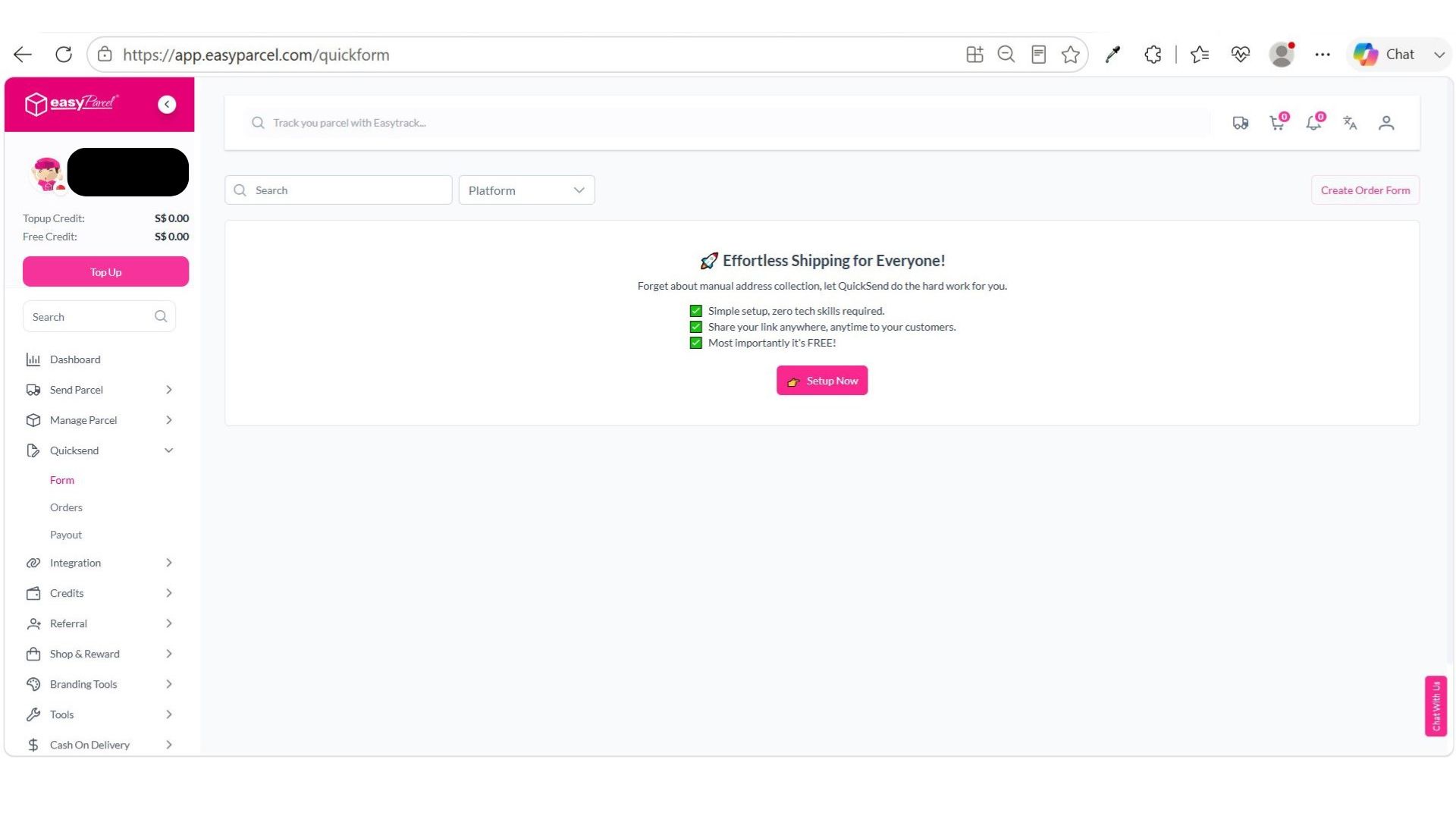
Login to EasyParcel

Log in to your EasyParcel account to access the QuickSend feature.
Step 1
Step 2 of 4

Create Order Form

Go to QuickSend, select 'Form', then click the 'Create Order Form' button at the top right corner.
Step 2
Step 3 of 4

Fill In Details & Publish

Fill in all the required details and information for your order form. Once completed, click the 'Publish & Preview' button at the top right corner.
Step 3
Step 4 of 4

Copy & Share Form Link

Return to QuickSend > Form, copy the generated form link, and share it with your customers so they can submit their order details.
Step 4
1 / 4
dynamic_feed

QuickSend

Create and share an order form in 4 steps.

Log in to your EasyParcel account to access the QuickSend feature.

Step 1

Go to QuickSend, select 'Form', then click 'Create Order Form' at the top right corner.

Step 2

Fill in all required details and information. Once completed, click 'Publish & Preview' at the top right corner.

Step 3

Return to QuickSend > Form, copy the generated form link, and share it with your customers.

Step 4

Power Your Business Growth with EasyParcel

ECOMMERCE INTEGRATION

Power Up Your Workflow with Seamless Integrations

Save time and cut down on manual tasks by fulfilling orders directly from your eCommerce platform such as WooCommerce and Shopify in just one click.
tracking-number-notification
TRACKING NUMBER NOTIFICATION

Stay Informed, Stay Ahead

Get instant alerts on tracking number when order made, keeping you and your recipient shipment status informed of the tracking information.
DUTIES & TAXES VISIBILITY

Gain Full Visibility into Duties & Taxes

Eliminate customs surprises! Get upfront estimates and transparent breakdowns of duties and taxes for international shipments. Make informed decisions and deliver a smooth experience for your global customers.
duties-taxes-visibility
auto-top-up
AUTO TOP UP

Never Run Out, Always Ship Smoothly

Set up automatic top-ups to ensure you always have enough credit for seamless shipping. Eliminate the risk of order delays and focus on what matters most – running your business smoothly.
Elevate your brand - Custom Branding
CUSTOM BRANDING

Elevate Your Brand

Increase brand awareness among customers through personalized shipping labels, tracking pages, SMS, and email notifications.

Hear From Our Clients

Frequently Asked Questions (FAQ)

Do I need to pay anything extra to integrate with QuickSend?
It's free! EasyParcel allows integration with 25+ platforms to auto-sync orders directly into the panel and ship them easily. Learn More.
Does QuickSend support merge orders function?
Yes. For orders sharing the same delivery address, the merge function allows consolidation into a single shipment with just one click. Learn more.

Connect QuickSend with EasyParcel Easily

Sync your QuickSend store orders automatically and streamline shipping, tracking, and fulfillment in one platform.

×