EasyParcel-logo-md

Ejenkita Seamless Integration

Enjoy automated shipping, real-time delivery updates, and seamless order fulfillment for your Ejenkita with EasyParcel, keeping your customers informed and satisfied every step of the way.

How EasyParcel Helps You?

Cross-Border Fulfilment

Expand your business by fulfiling orders from Malaysia & Singapore with ease.

Backup Shipping Option

Maintain a seamless shipping experience by offering a flat rate.

All-in-One Integration Setup

Integrate EasyParcel with all your eCommerce platforms at once, no separate setups needed.

One-Stop Order Management

Streamline your operations by managing orders from all platforms within a single account.

Easy Setup Steps

Use EasyParcel’s one-click fulfilment to quickly ship multiple Ejenkita orders.

Zero Cost

Integrate without any setup fees, keeping your costs low and budget intact.

Need Help? WhatsApp for Premium Support!

How To Integrate Ejenkita with EasyParcel?

Ejenkita x EasyParcel Integration
Enlarged screenshot
100%
dynamic_feed

EasyConnect

Integrate Ejenkita with EasyParcel in 5 steps.

  • login

    Install Ejenkita App

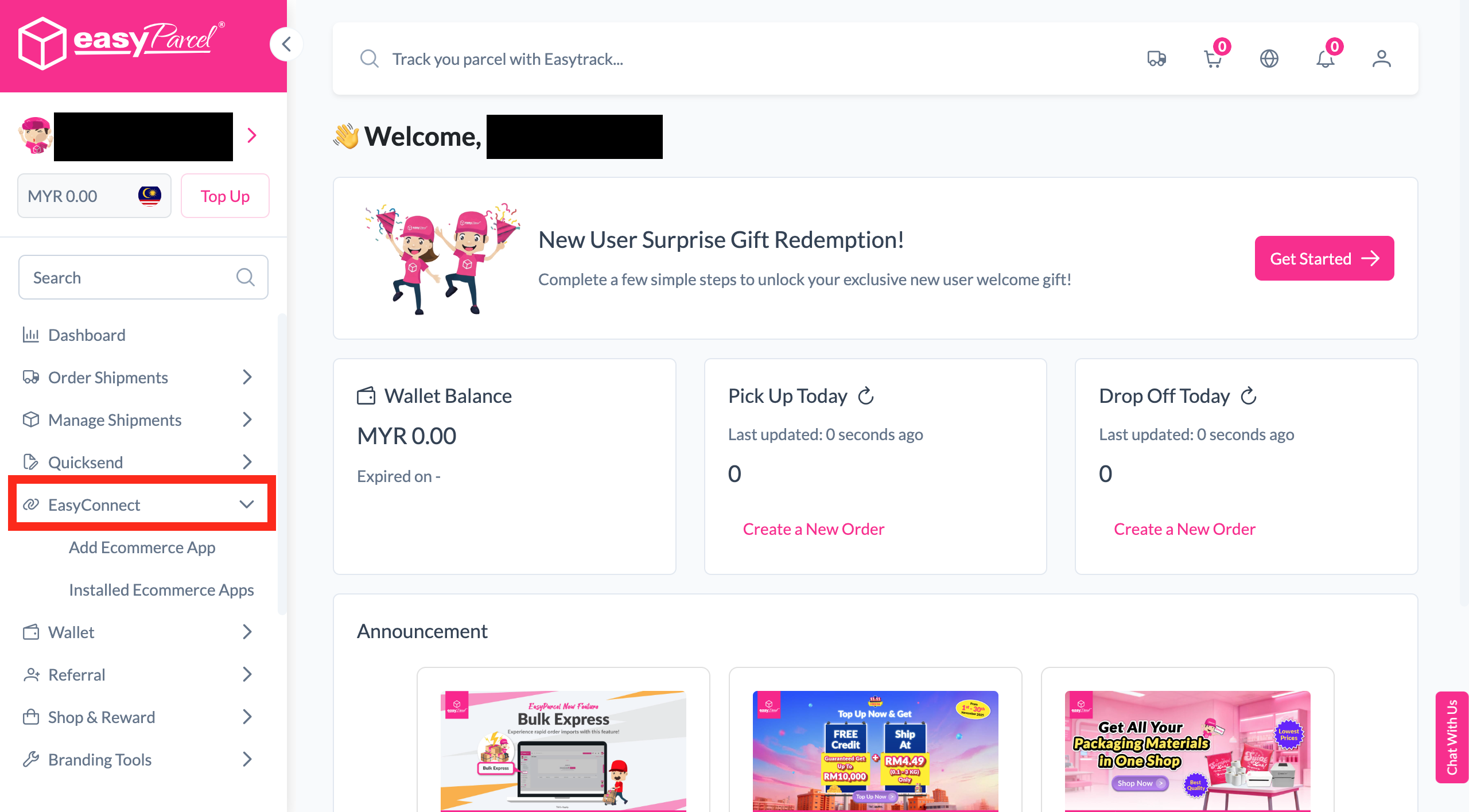
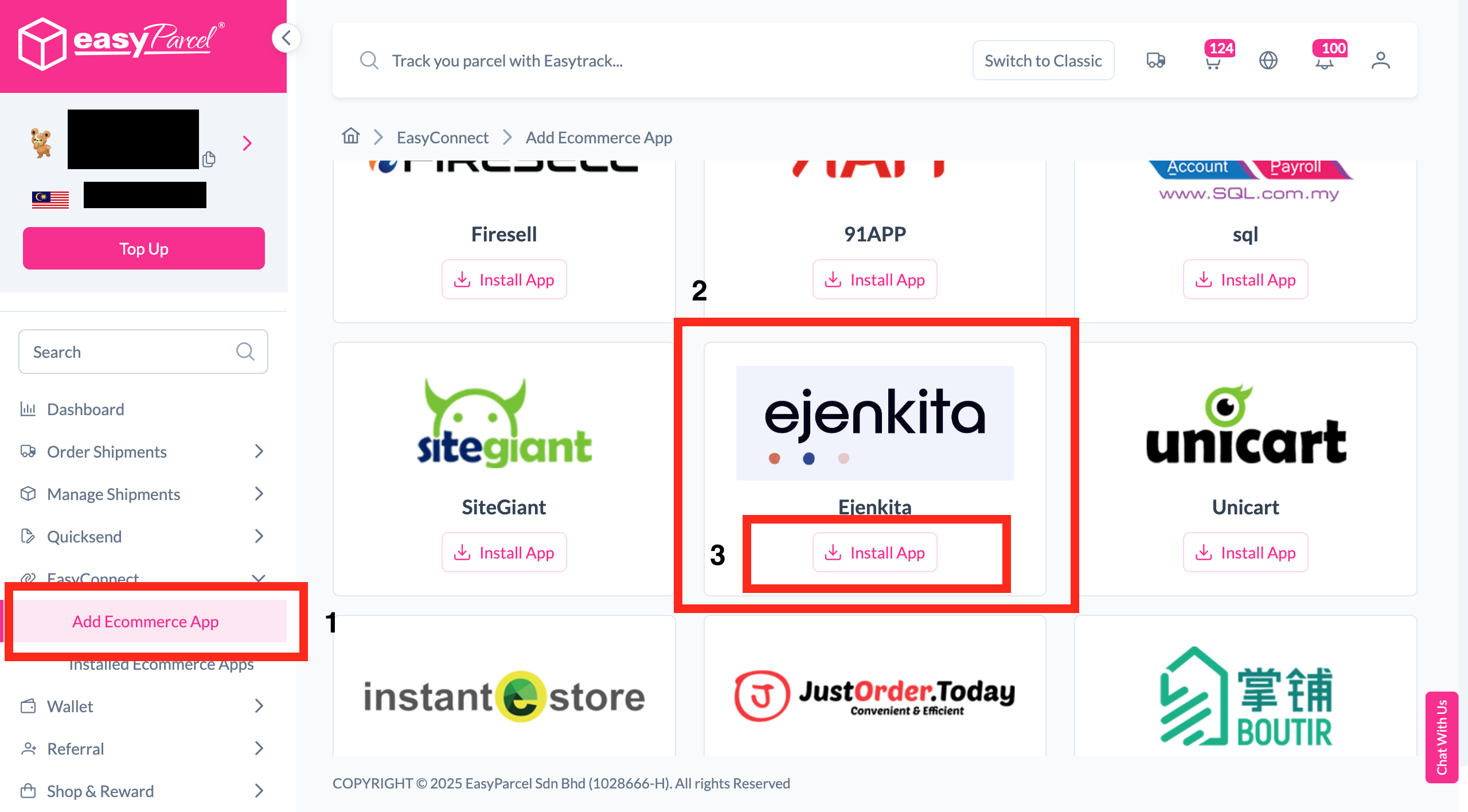
    Under "Integration", click "Add Ecommerce App", find "Ejenkita" and click "Install App".

  • edit_note

    Fill In Store Details

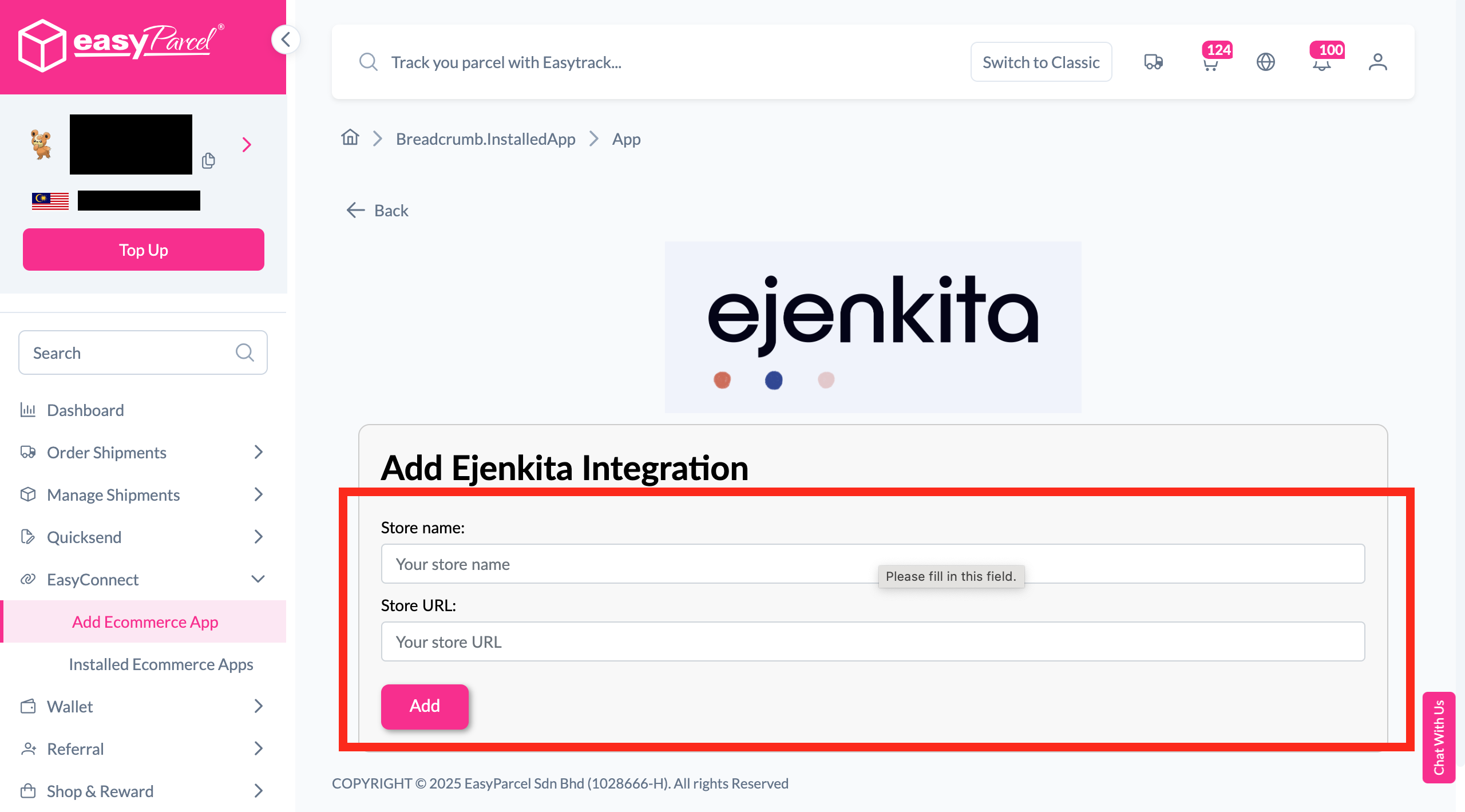
    Fill in the Store name and Store URL, then click "Add".

  • key

    Copy Your API Key

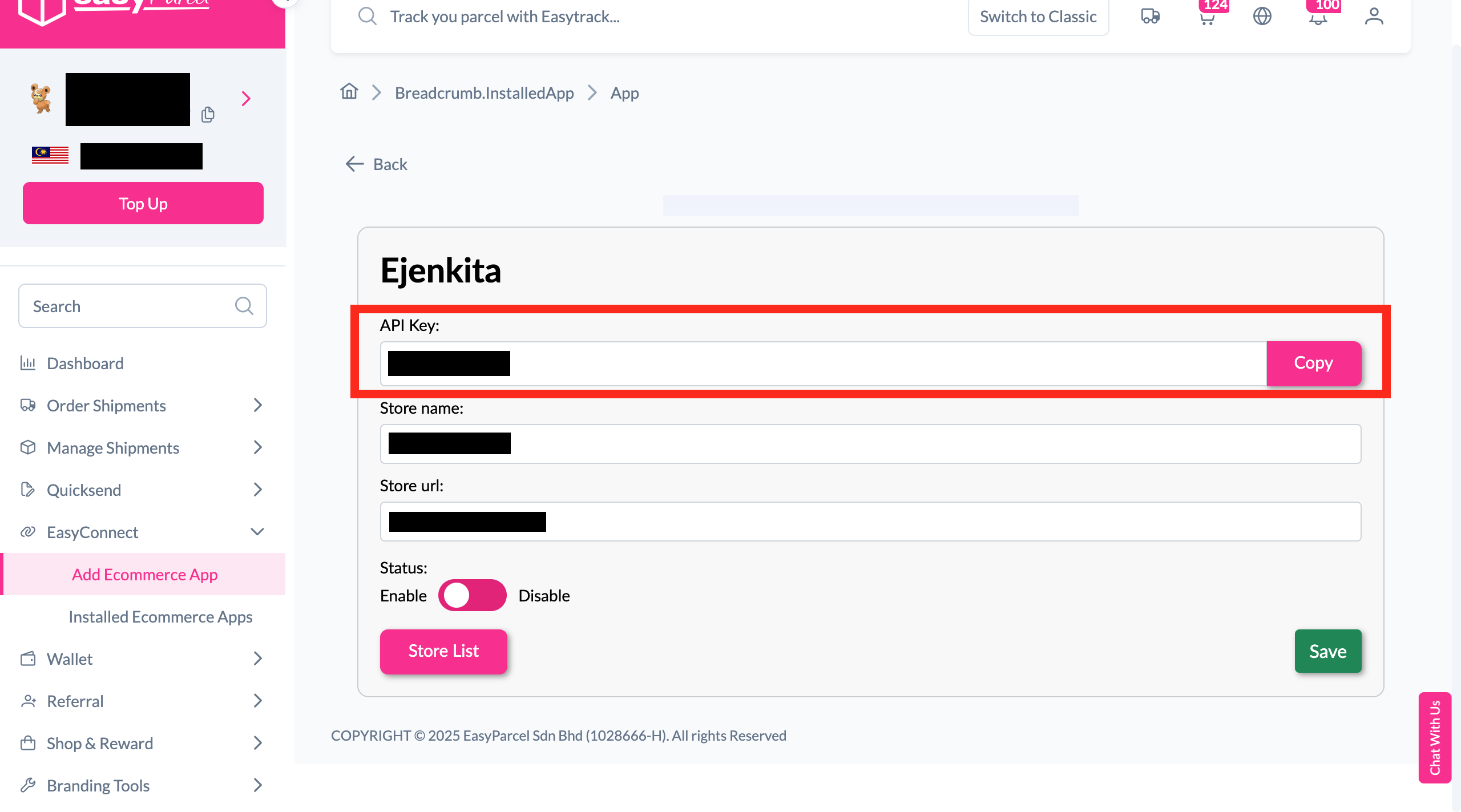
    Your store API key / Integration ID will be generated. Copy it to integrate with your store.

  • storefront

    Connect in Ejenkita

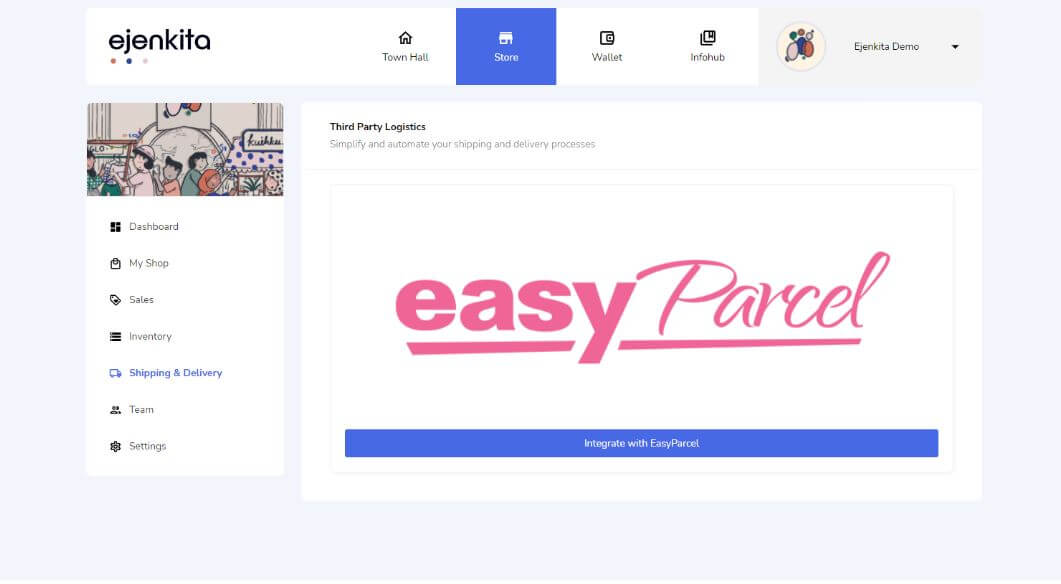
    Log in to your Ejenkita account and click 'Integrate with EasyParcel'.

  • check_circle

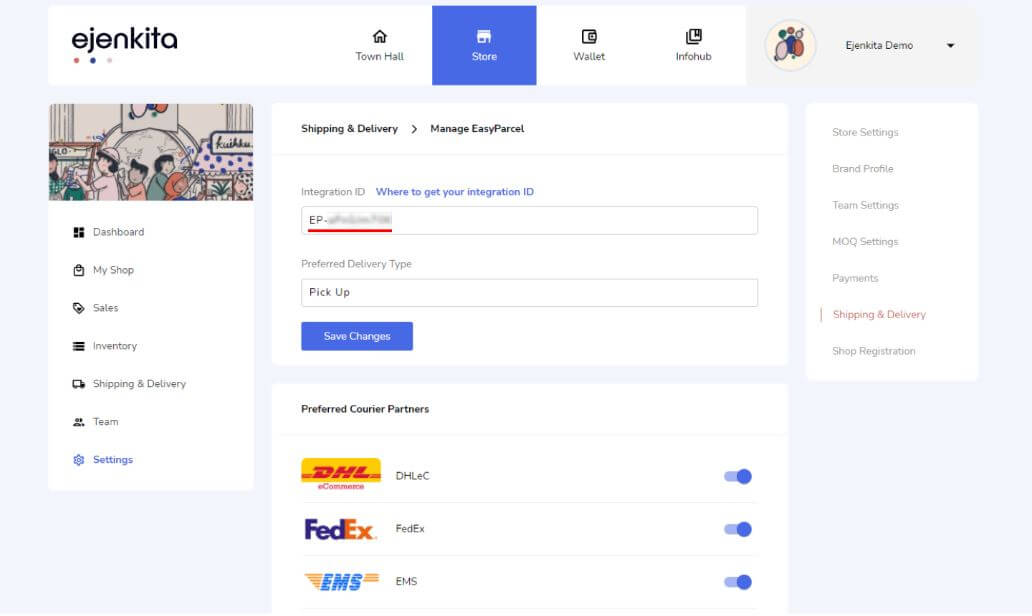
    Paste Your API Key

    Paste your API key at the 'Integration ID' field to complete the setup.

Step 1 of 5

Install Ejenkita App

Log in to your EasyParcel account, navigate to EasyConnect, then click 'Add Ecommerce App'. Find 'Ejenkita' and click 'Install App' to get started.
Step 2 of 5

Fill In Store Details

Fill in your Store name and Store URL, then click 'Add' to proceed.
Step 2
Step 3 of 5

Copy Your API Key

Your store API key / Integration ID will be generated. Copy it and use it to integrate with your Ejenkita store.
Step 3
Step 4 of 5

Connect in Ejenkita

Log in to your Ejenkita account and click 'Integrate with EasyParcel' to begin the connection.
Step 4
Step 5 of 5

Paste Your API Key

Paste your API key into the 'Integration ID' field — your integration is complete!
Step 5
1 / 5
dynamic_feed

EasyConnect

Integrate Ejenkita with EasyParcel in 5 steps.

Log in to your EasyParcel account, navigate to EasyConnect, then click 'Add Ecommerce App'. Find 'Ejenkita' and click 'Install App' to get started.

Fill in your Store name and Store URL, then click 'Add' to proceed.

Step 2

Your store API key / Integration ID will be generated. Copy it and use it to integrate with your Ejenkita store.

Step 3

Log in to your Ejenkita account and click 'Integrate with EasyParcel' to begin the connection.

Step 4

Paste your API key into the 'Integration ID' field — your integration is complete!
Step 5

Hear From Our Clients

Frequently Asked Questions (FAQ)

What does Ejenkita do?
Ejenkita is an integrated in-app e-commerce feature allowing brands, merchants, and creators to showcase and sell products directly within XiaoHongShu.
Can I bulk fulfill orders?
Yes. After connecting Ejenkita to EasyParcel, multiple orders can be selected and fulfilled to EasyParcel with a single click.

Connect Ejenkita with EasyParcel Seamlessly

Sync your Ejenkita orders automatically and manage shipping, tracking, and fulfillment from one platform.

×