BigSeller x EasyParcel Seamless Integration
EasyParcel-logo-md
BigSeller x EasyParcel Seamless Integration
EasyParcel-logo-md

BigSeller Seamless Integration

Streamline your BigSeller with EasyParcel. Enjoy automated shipping, delivery updates, and improved customer satisfaction.
Connect now and elevate your eCommerce business.

How EasyParcel Helps You?

Custom Shipping Rates

Set custom shipping rates within BigSeller to match your pricing.

Zero Cost

Integrate without any setup fees, keeping your costs low and budget intact. Integrate Now!

80% Time Savings

Automate shipping to save time and focus on your business. Integrate Now!

Expand Global Market

Seamlessly ship internationally, expanding your BigSeller customer base.

4 Easy Setup Steps

Easily integrate EasyParcel with BigSeller, simplifying shipping processes.

Free Integration Demo

Get a free demo to understand the integration process and benefits.

Need Help? WhatsApp for Premium Support!

How To Integrate BigSeller with EasyParcel?

BigSeller x EasyParcel Integration
Enlarged screenshot
100%
dynamic_feed

EasyConnect

Integrate BigSeller with EasyParcel in 4 steps.

  • login

    Login & Find API Key

    Log in to EasyParcel, go to Integrations and locate the 'API Key' option.

  • key

    Generate & Copy API Key

    Expand 'Individual API', fill in contact details, save and copy the API key.

  • link

    Connect EasyParcel in BigSeller

    Go to Authorization Center in BigSeller and connect EasyParcel Singapore.

  • local_shipping

    Set Up Shipping Info

    Click 'Edit' to add your sender address and configure logistics settings.

Step 1 of 4

Login & Find API Key

Register an EasyParcel account or log in to your existing account. Go to 'Integrations', click on 'Add New Store', and scroll down to the bottom to find the 'API KEY'.
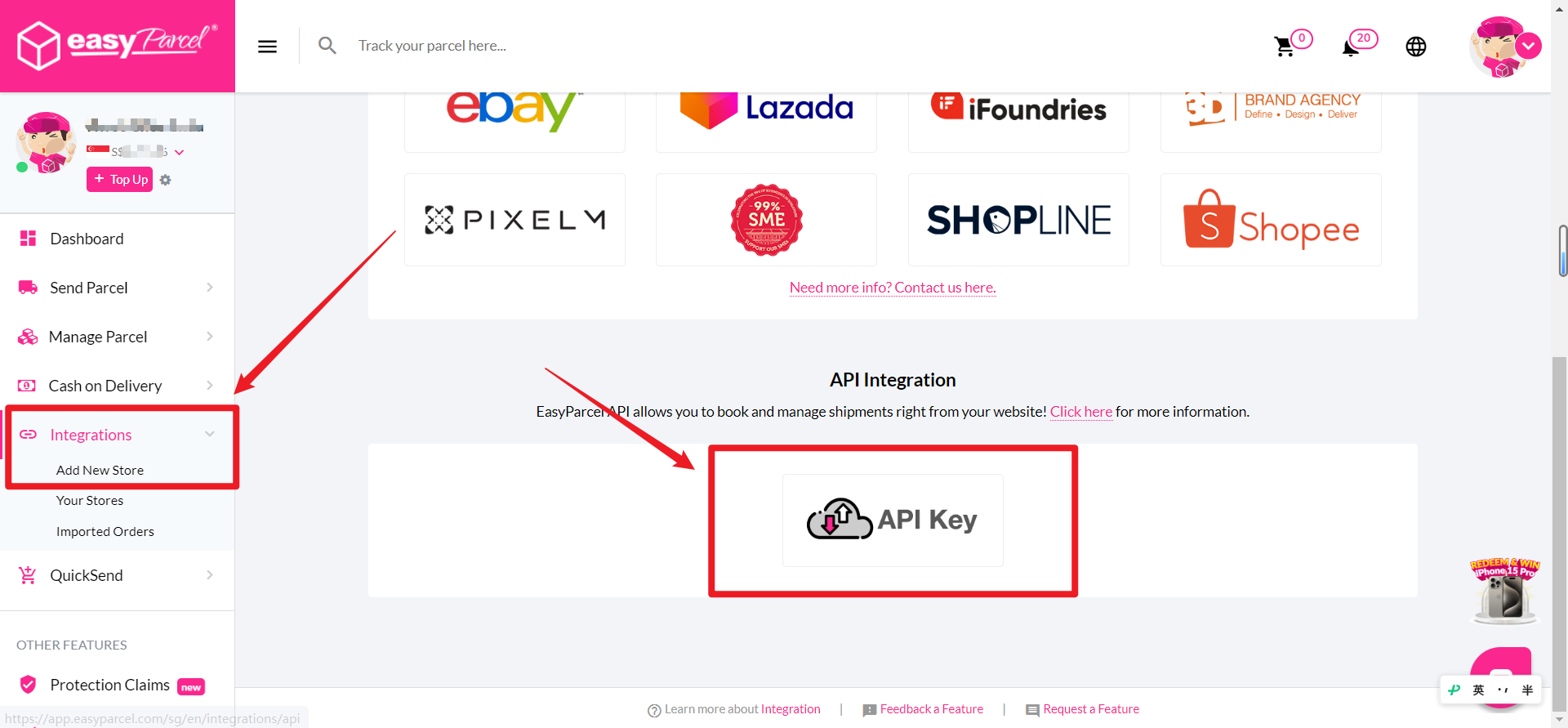
Step 1
Step 2 of 4

Generate & Copy API Key

To generate an API Key for the first time, expand the Individual API section, enter the contact person's name and phone number, then click 'Save'. Copy the API Key.
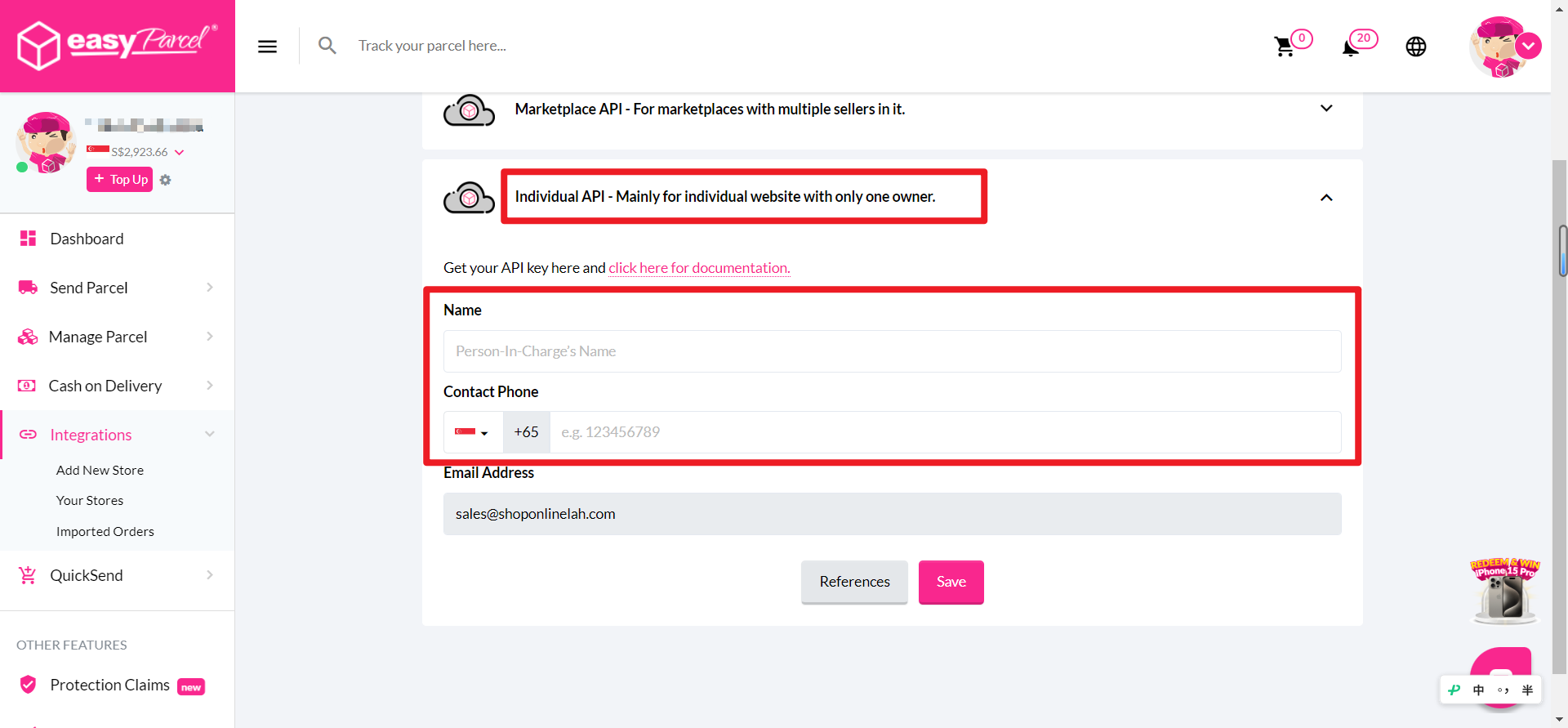
Step 2 screenshot
Step 3 of 4

Connect EasyParcel in BigSeller

Log in to your BigSeller account, navigate to 'Settings' > 'Authorization Center' > 'Third-party Logistics', choose 'Singapore', click on 'EasyParcel Singapore', then click 'Connect'.
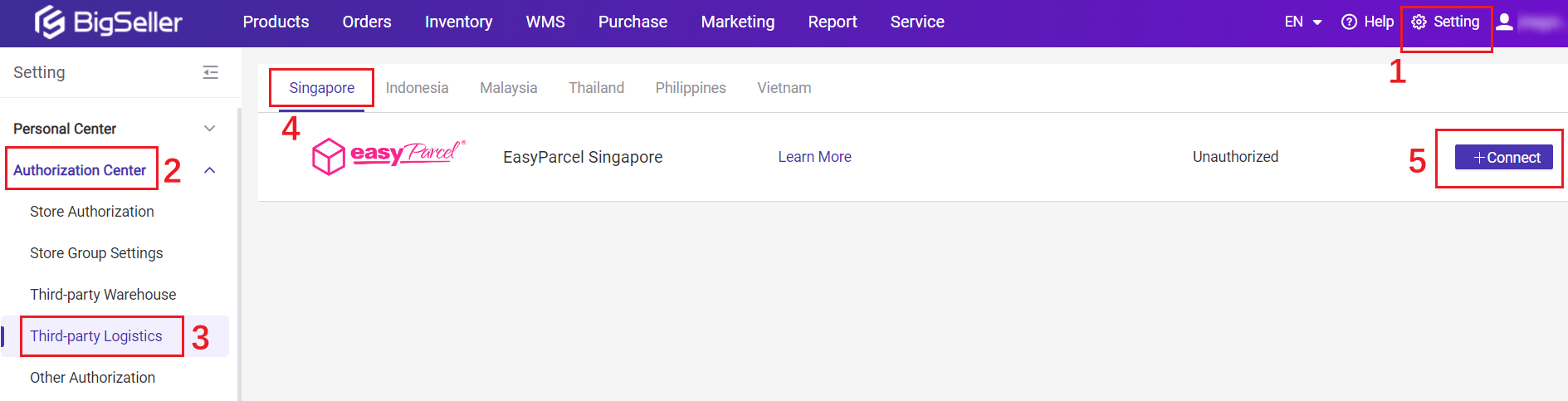
Step 3 screenshot
Step 4 of 4

Set Up Shipping Info

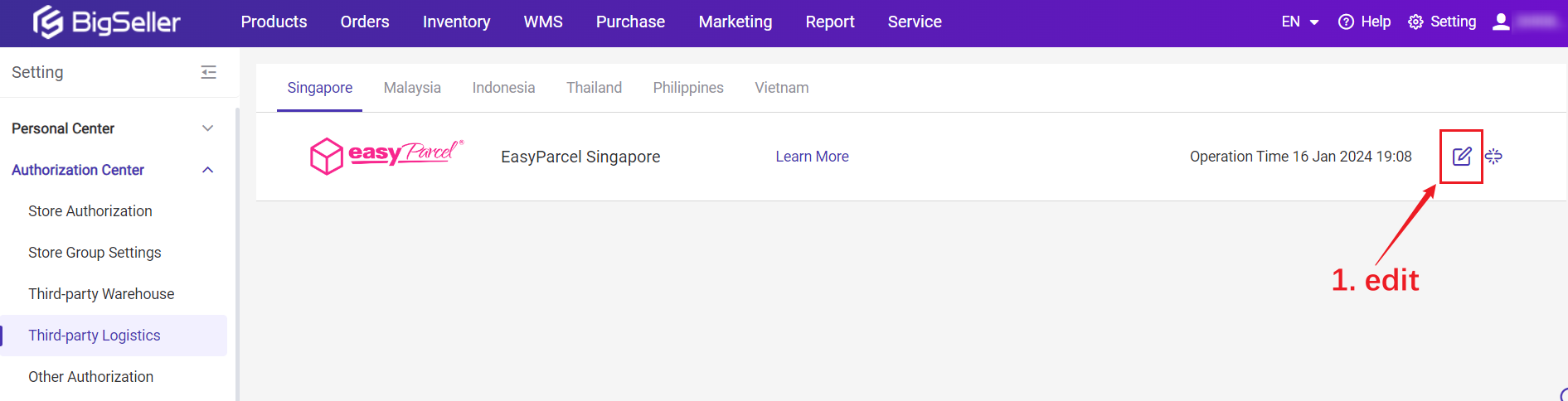
Next, set up your Shipping Info by clicking the 'Edit' button. Add your sender address and configure the logistics settings.
Step 4 screenshot
1 / 4
dynamic_feed

EasyConnect

Integrate BigSeller with EasyParcel in 4 steps.

Register an EasyParcel account or log in. Go to 'Integrations', click on 'Add New Store', and scroll down to find the 'API KEY'.

Step 1

Expand the Individual API section, enter the contact person's name and phone number, then click 'Save'. Copy the API Key.

Step 2

Navigate to 'Settings' > 'Authorization Center' > 'Third-party Logistics', choose 'Singapore', click on 'EasyParcel Singapore', then click 'Connect'.

Step 3

Set up your Shipping Info by clicking the 'Edit' button. Add your sender address and configure the logistics settings.

Step 4

Power Your Business Growth with EasyParcel

ECOMMERCE INTEGRATION

Power Up Your Workflow with Seamless Integrations

Save time and cut down on manual tasks by fulfilling orders directly from your eCommerce platform such as WooCommerce and Shopify in just one click.
tracking-number-notification
TRACKING NUMBER NOTIFICATION

Stay Informed, Stay Ahead

Get instant alerts on tracking number when order made, keeping you and your recipient shipment status informed of the tracking information.
DUTIES & TAXES VISIBILITY

Gain Full Visibility into Duties & Taxes

Eliminate customs surprises! Get upfront estimates and transparent breakdowns of duties and taxes for international shipments. Make informed decisions and deliver a smooth experience for your global customers.
duties-taxes-visibility
auto-top-up
AUTO TOP UP

Never Run Out, Always Ship Smoothly

Set up automatic top-ups to ensure you always have enough credit for seamless shipping. Eliminate the risk of order delays and focus on what matters most – running your business smoothly.
Elevate your brand - Custom Branding
CUSTOM BRANDING

Elevate Your Brand

Increase brand awareness among customers through personalized shipping labels, tracking pages, SMS, and email notifications.

Hear From Our Clients

Frequently Asked Questions (FAQ)

Can I auto-import my orders from BigSeller?
Yes. You can sync your BigSeller website with EasyParcel, and your incoming orders will be automatically imported. Start Now.
Do I need to pay anything extra to add BigSeller to my EasyParcel account?
It's free! EasyParcel allows you to integrate 25+ platforms to auto-sync orders directly into the panel and ship them easily. Learn More.

Connect BigSeller with EasyParcel Seamlessly

Sync your marketplace orders automatically and simplify shipping, tracking, and fulfillment from one platform.

×