cubecart integration

Ship Your Cubecart Orders

EasyParcel helps Cubecart users to ship domestically.
It’s free. Pay as you ship.

Why Integration?

How Does It Work?

Find Out How Easy It Is To Use EasyParcel

1. Link

Sync your store with EasyParcel with few clicks only

2. Receive

Have your orders pushed to EasyParcel automatically

3. Book

Compare and book your prefered courier

4. Track

Track your parcels anytime at your convenience

Join Our Family

8127 Companies Have Integrated With Us
cubecart integration
EasyParcel-logo-md
cubecart integration
EasyParcel-logo-md

Cubecart Seamless Integration

Enjoy automated shipping, real-time delivery updates, and seamless order fulfillment for your Cubecart with EasyParcel, keeping your customers informed and satisfied every step of the way.

How EasyParcel Helps You?

Cross-Border Fulfilment

Expand your business by fulfiling orders from Malaysia & Singapore with ease.

Backup Shipping Option

Maintain a seamless shipping experience by offering a flat rate.

All-in-One Integration Setup

Integrate EasyParcel with all your eCommerce platforms at once, no separate setups needed.

One-Stop Order Management

Streamline your operations by managing orders from all platforms within a single account.

5 Easy Setup Steps

Use EasyParcel’s one-click fulfilment to quickly ship multiple Cubecart orders.

Zero Cost

Integrate without any setup fees, keeping your costs low and budget intact.

Need Help? WhatsApp for Premium Support!

How To Integrate Cubecart with EasyParcel?

CubeCart x EasyParcel Integration
Enlarged screenshot
100%
dynamic_feed

EasyConnect

Integrate CubeCart with EasyParcel in 4 steps.

  • install_desktop

    Install the App

    Find CubeCart in EasyConnect and click Install App.

  • lock_open

    Grant Access

    Authorize EasyParcel to access your store.

  • store

    Connect Your Store

    Enter your store name and click Next.

  • upload_file

    Upload Integration Kit

    Download, upload, and submit the integration kit URL.

Step 1 of 4

Install the App

In the Next Gen Portal, navigate to 'EasyConnect' → 'Add Ecommerce App'. Find the CubeCart app and click 'Install App'.
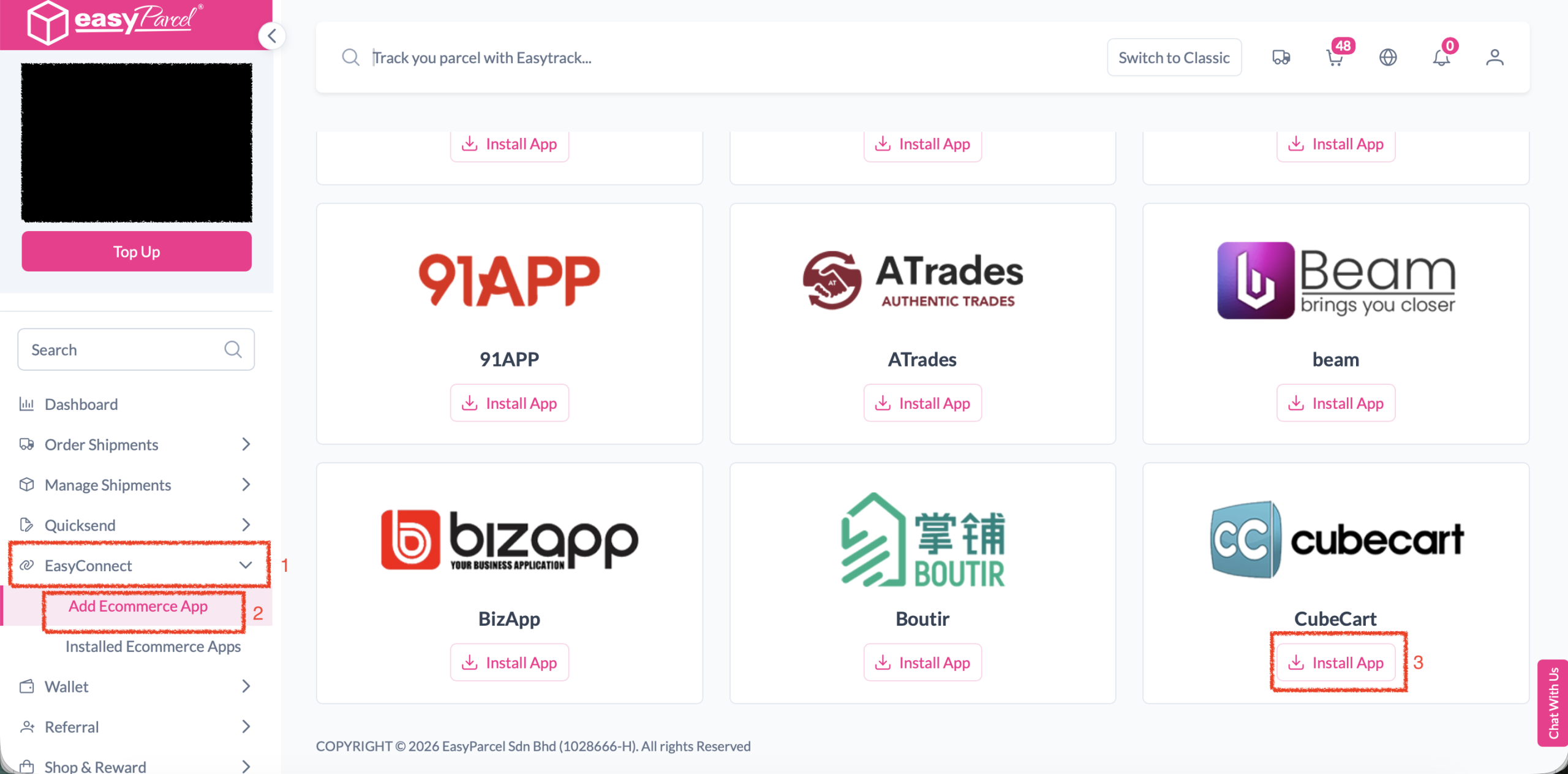
Step 1 screenshot
Step 2 of 4

Grant Access

Click 'Allow Access' when prompted to authorize EasyParcel to connect with your CubeCart store.
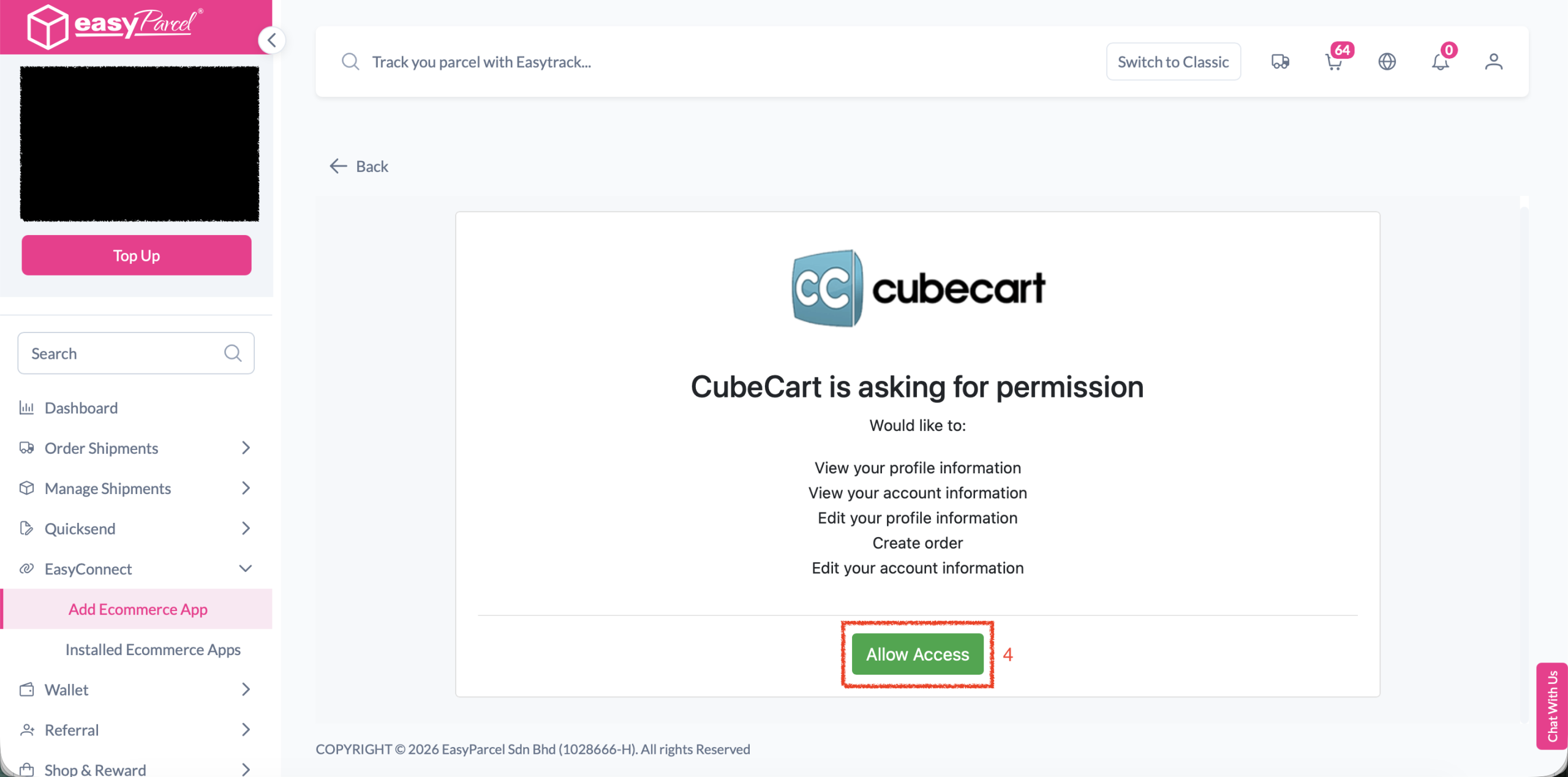
Step 2 screenshot
Step 3 of 4

Connect Your Store

Enter your store name in the field provided, then click 'Next' to proceed.
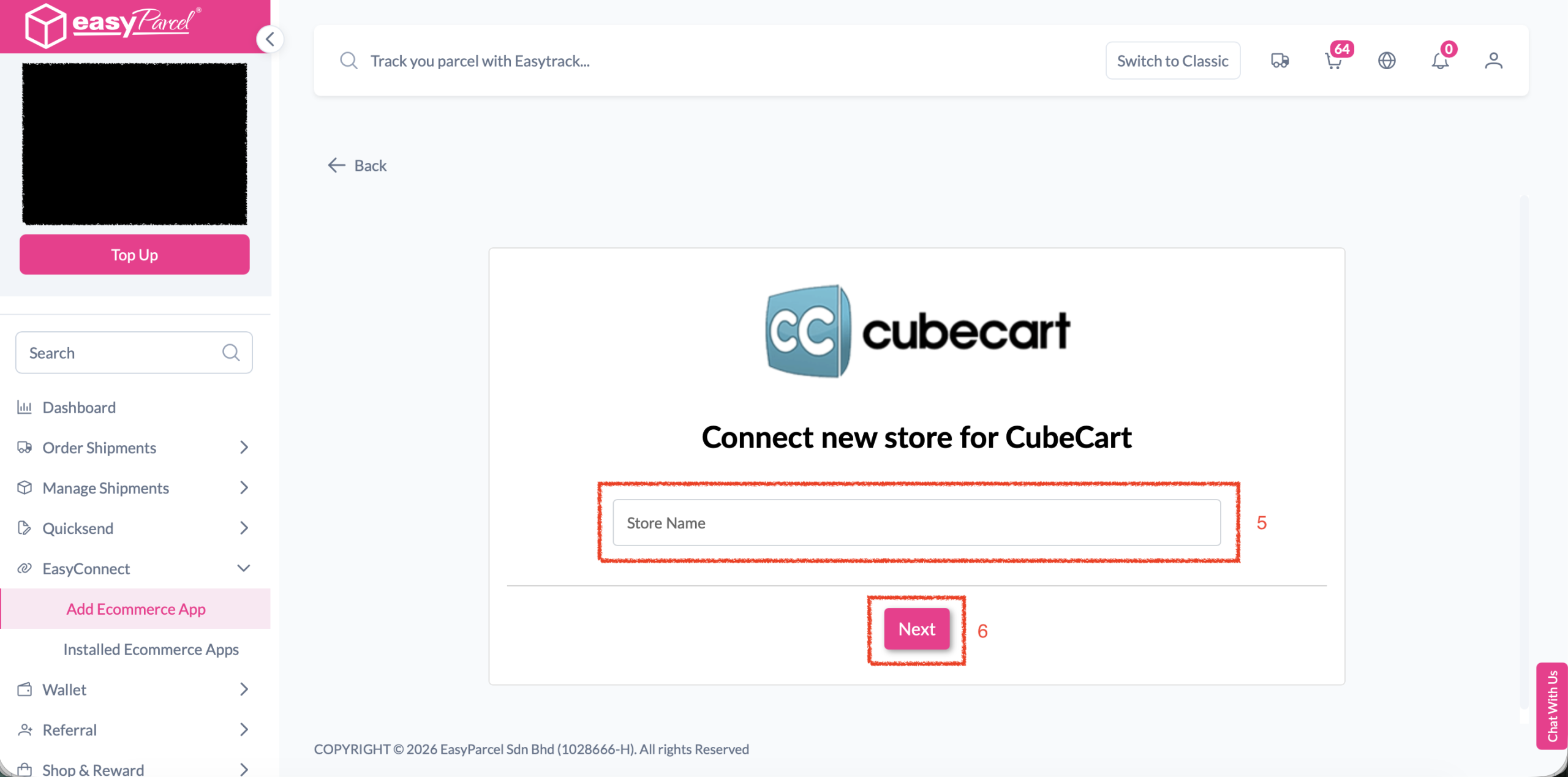
Step 3 screenshot
Step 4 of 4

Upload Integration Kit

Download the integration kit provided. Upload the kit to your CubeCart system folder. Then enter the integration kit URL in the field and click 'SUBMIT' to complete your integration.
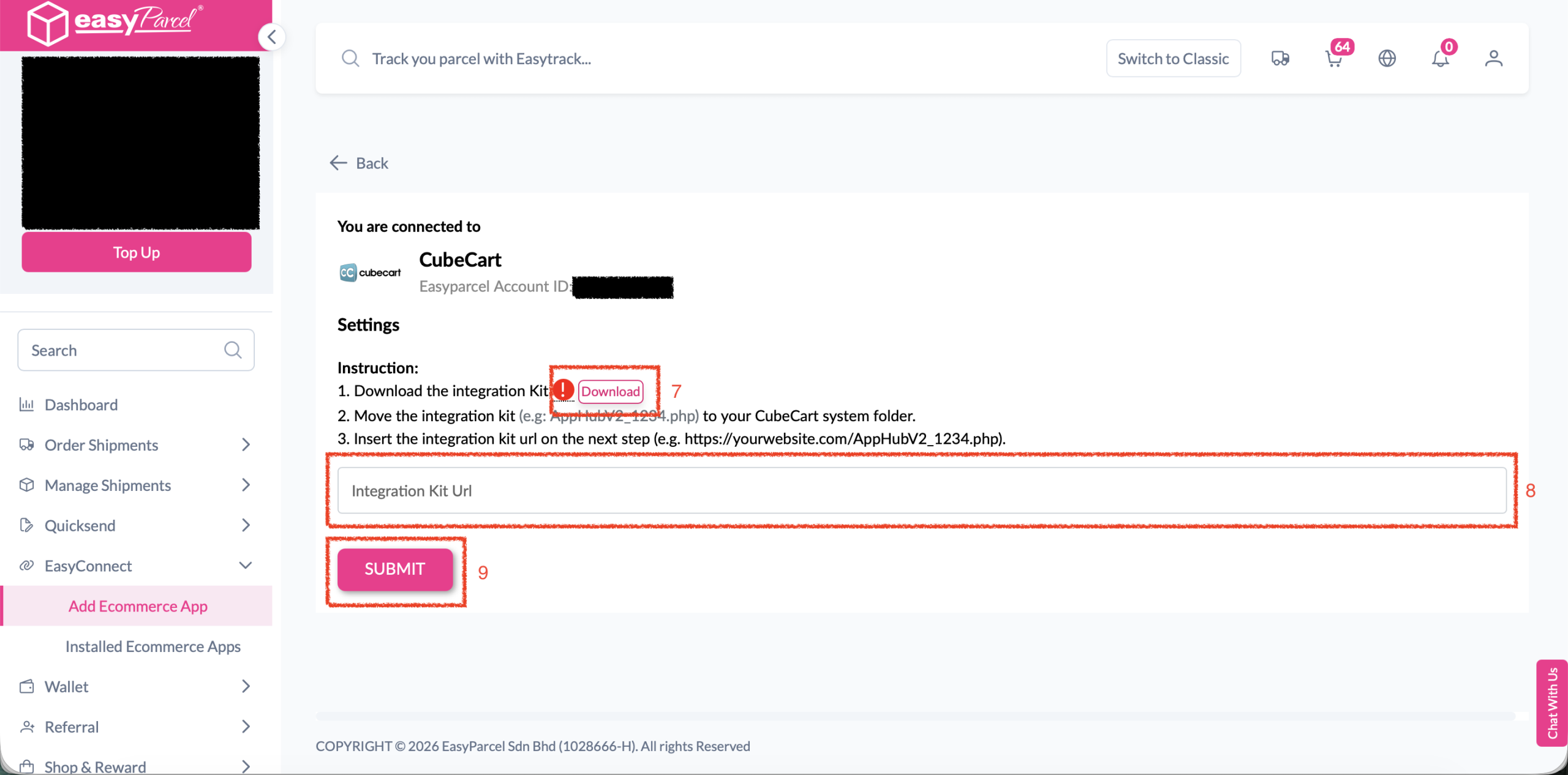
Step 4 screenshot
1 / 4
dynamic_feed

EasyConnect

Integrate CubeCart with EasyParcel in 4 steps.

In the Next Gen Portal, navigate to 'EasyConnect' → 'Add Ecommerce App'. Find the CubeCart app and click 'Install App'.

Step 1

Click 'Allow Access' when prompted to authorize EasyParcel to connect with your CubeCart store.

Step 2

Enter your store name in the field provided, then click 'Next' to proceed.

Step 3

Download the integration kit provided. Upload it to your CubeCart system folder. Then enter the integration kit URL and click 'SUBMIT' to complete your integration.

Step 4

Hear From Our Clients

Posted on Google Google
Sharon Tiang Qin Yee profile picture
Sharon Tiang Qin Yee
23 October 2026
Google star 1Google star 2Google star 3Google star 4Google star 5
Excellent service from Mr Hafiz. Prompt responses, resolved my courier delayed issues. Thumbs up
Posted on Google Google
zyzy kimi profile picture
zyzy kimi
22 October 2026
Google star 1Google star 2Google star 3Google star 4Google star 5
Kudos to Siti !! She help me from A to Z for international shipping , she explain you all in details and make the process so smooth . Thank you again for you kind , keep up the good work ! <3
Posted on Google Google
MIN KHIM PNEH profile picture
MIN KHIM PNEH
21 October 2026
Google star 1Google star 2Google star 3Google star 4Google star 5
Good customer service with prompt response and handled feedback seriously.
Posted on Google Google
Nurhanina Mohamad Akib profile picture
Nurhanina Mohamad Akib
11 October 2026
Google star 1Google star 2Google star 3Google star 4Google star 5
EasyParcel team was very supportive and fast in dealing with and responding to my problem. Hats off!
Posted on Google Google
Danish's Red Kitchen profile picture
Danish's Red Kitchen
29 September 2026
Google star 1Google star 2Google star 3Google star 4Google star 5
I have been using Easyparcel for years and very satisfied with their service. Most notably, their customer service. Handled any issues with utmost care and speed. Interface is very user-friendly and informative for me to choose. Tracking is accurate in real time. API is good as well. Most importantly, cheap and affordable price. Thank you for the good service o7
Posted on Google Google
DR NUR SYUHADA BT ABU BAKAR (MOH) profile picture
DR NUR SYUHADA BT ABU BAKAR (MOH)
21 September 2026
Google star 1Google star 2Google star 3Google star 4Google star 5
Most stressful moment when I have to ship my personal parcels to Middle East in the midst of uncertainties due to the w**. But Easyparcel has made it easy for me. Big thanks to Selena Choong for assisting me from the beginning until the parcels arrived safely in our home here in Middle East. She has shown excellent performance and assistance ensuring every issue was successfully resolved.
frequently-asked-questions

Frequently Asked Questions (FAQ)

What does Cubecart do?
Cubecart is an integrated in-app e-commerce feature allowing brands, merchants, and creators to showcase and sell products directly.
Can I bulk fulfill orders?
Yes. After connecting Cubecart to EasyParcel, multiple orders can be selected and fulfilled to EasyParcel with a single click.

Connect Cubecart with EasyParcel Seamlessly

Sync your Cubecart orders automatically and manage shipping, tracking, and fulfillment from one platform.

×